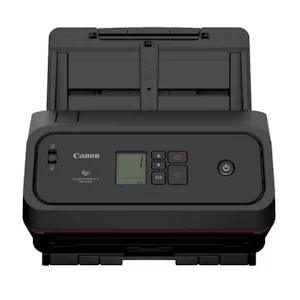
60 pages per minute/120 ipm Can scan in B/W, Grayscale and Color.
Recommended Daily Duty Cycle is 13,000 scans.
Designed to keep work moving, the Canon imageFORMULA DR-C360 office document scanner
delivers reliable document capture. From everyday business documents to passports scanned without a carrier sheet1, it handles a wide variety of document types, quickly transforming paper into high-quality digital files. Its compact design, approximately 30 percent smaller than previous models, fits comfortably into virtually any office environment, making it an ideal solution for space-conscious workspaces without sacrificing performance. For organizations deploying multiple devices, the DR Scanner Management tool streamlines administration by providing centralized control and reducing the effort required for large-scale rollouts.
From healthcare and finance to education and the public sector, the imageFORMULA DR-C360 is designed to support the
document capture needs of today’s organizations. Its versatile scanning capabilities help transform paper-based information into
digital workflows, enabling process automation, fast information sharing, and collaboration across departments. Whether digitizing
documents such as patient records, financial documents, student files, or government forms, the imageFORMULA DR-C360 can
help organizations work efficiently while keeping information accessible with options to implement security features.
PRECISION IMAGING. RELIABLE RESULTS
Designed to deliver reliable image quality across a wide range of documents, advanced image processing features automatically
optimize each scan for clear, accurate results. Auto color detection and auto resolution settings help simplify mixed-batch
scanning by automatically adjusting output settings based on document type, helping maintain image clarity while optimizing
file size for efficient storage and sharing. For challenging documents, features such as character emphasis and text enhancement improve text visibility and readability, helping ensure important information is captured accurately.
BUILT TO HANDLE MORE
The imageFORMULA DR-C360 delivers fast, reliable scanning performance with the flexibility to handle a wide variety of
document types, including thick and thin documents, long pages, oversized media, plastic cards, embossed cards, and passports
without a carrier sheet1. Capable of scanning up to 60 pages per minute in both color and black-and-white2, it helps organizations digitize information quickly and efficiently. A 100-sheet automatic document feeder and advanced paper feeding capabilities
help support high-volume scanning while accommodating a broad range of document sizes. This versatility allows users to
confidently scan diverse materials while maintaining smooth, consistent operation.
SOFTWARE THAT THINKS AHEAD
The imageFORMULA DR-C360 scanner includes a robust suite of software applications. Canon’s CaptureOnTouch software
lets you scan directly to compatible cloud apps3 like Microsoft® SharePoint®, Dropbox, Google DriveTM, and OneDrive. This helps
simplify document sharing and teamwork. Combined with Tungsten Virtual ReScan (VRS) Elite and Readiris PDF, the bundled software helps
improve scan quality and organization. It also includes Windows, ISIS®, and TWAIN drivers for easy setup with third-party systems.
Plus, it works seamlessly with the latest Mac OS versions.
SIMPLE OPERATION
Designed with ease of use in mind, the scanner features an intuitive operation panel with an LCD display, user-friendly icons,
and one-touch job buttons that allow users to quickly start scanning, create customized workflows, and complete frequently
done tasks with ease. Supporting a variety of document types and sizes in mixed batches, it helps reduce the need for manual sorting and improves overall scanning efficiency.
CUSTOMER CARE
Protect your investment with eCarePAK options designed to extend support beyond the initial three-year advanced exchange
warranty period. These flexible service offerings can help reduce the cost and complexity of post-purchase maintenance while
helping maximize uptime and ensure reliable performance throughout the product lifecycle.
Depending on the condition of the passport, the Passport Carrier Sheet may be required to prevent the passport from being damaged.
Examples based on typical settings, rated in pages/images per minute with letter-sized documents at 200 dpi portrait feeding directions. Processing speed is based on internal testing. Actual processing speeds may vary based on PC performance and application. In addition, first processing speed may vary based on warm-up time and other restrictions.
Subscription to a third-party cloud service required. Subject to third-party cloud service provider’s terms and conditions
Calculations based on scanning speed and assumed daily time of use.